Your life has patterns. Start tracking them.
Note to Self
A private, easy to use mood and energy tracker. Your data stays on your phone.
Available now for iPhone.
See it work
A quick video of Sara using the app herself
Screens
What it looks like
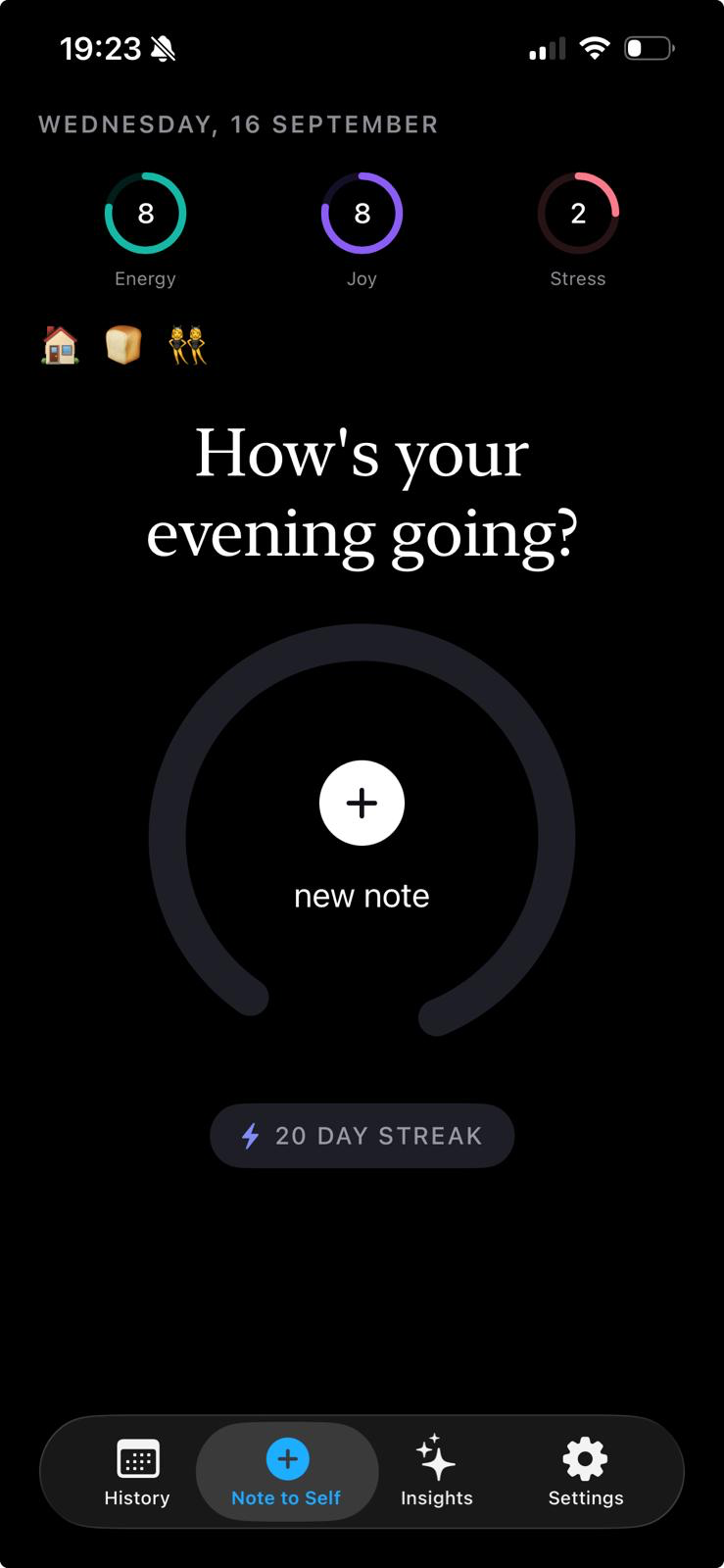
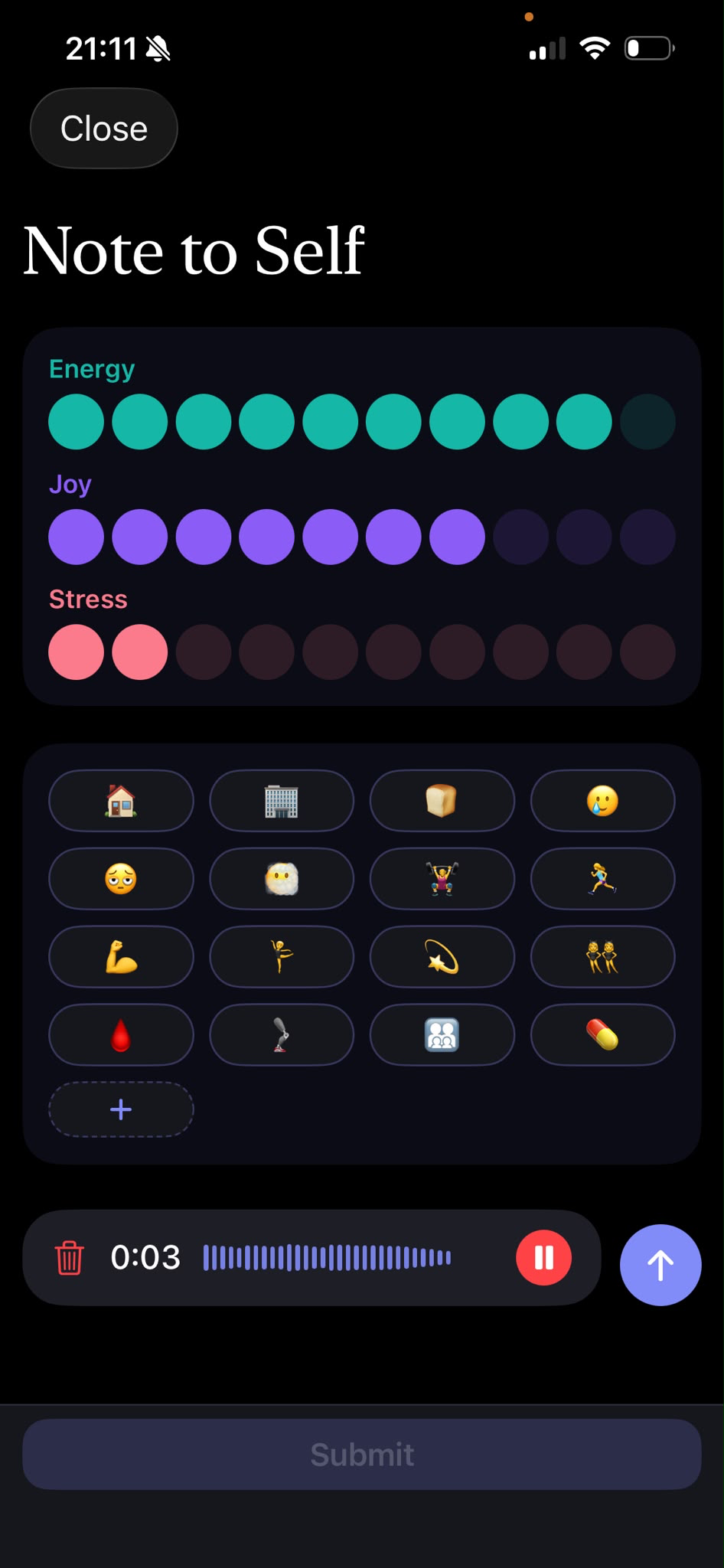
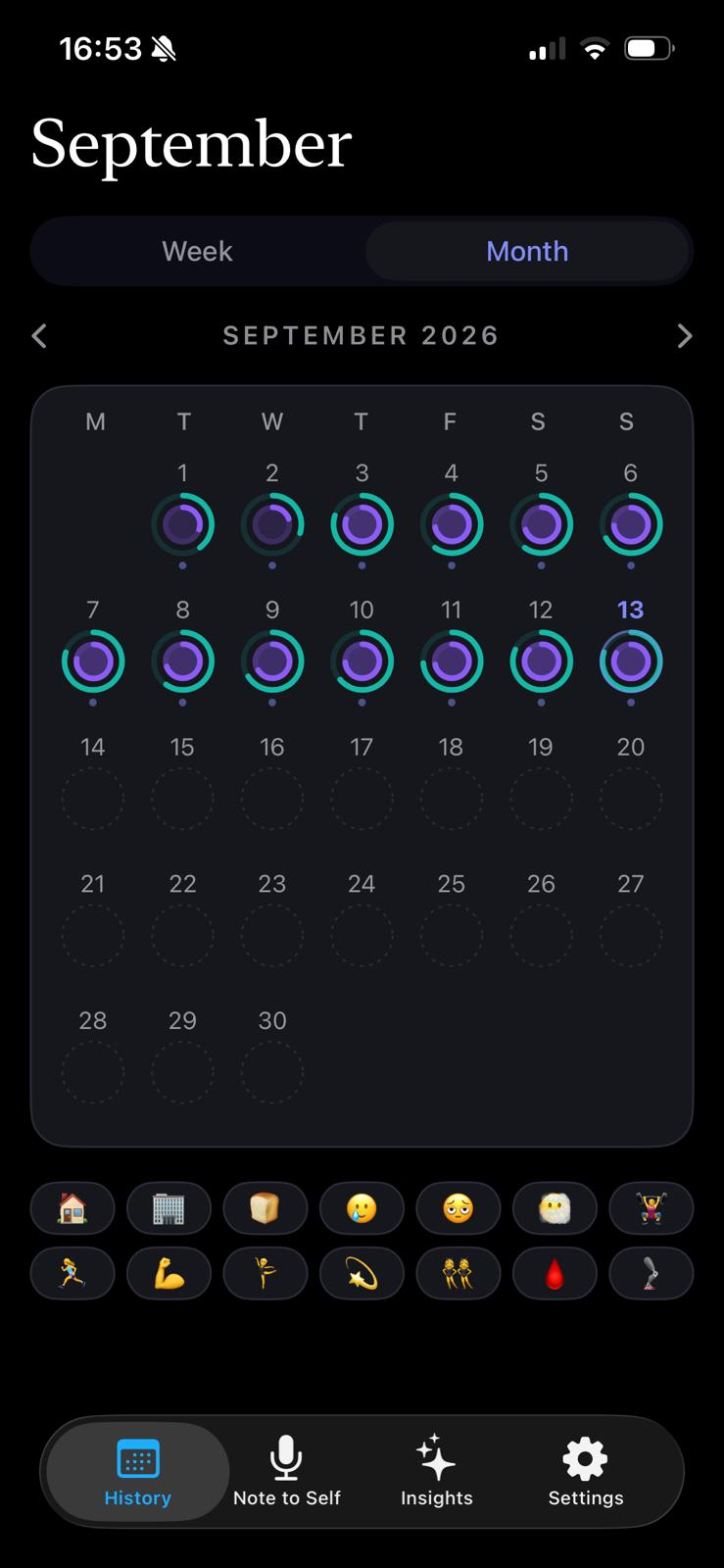
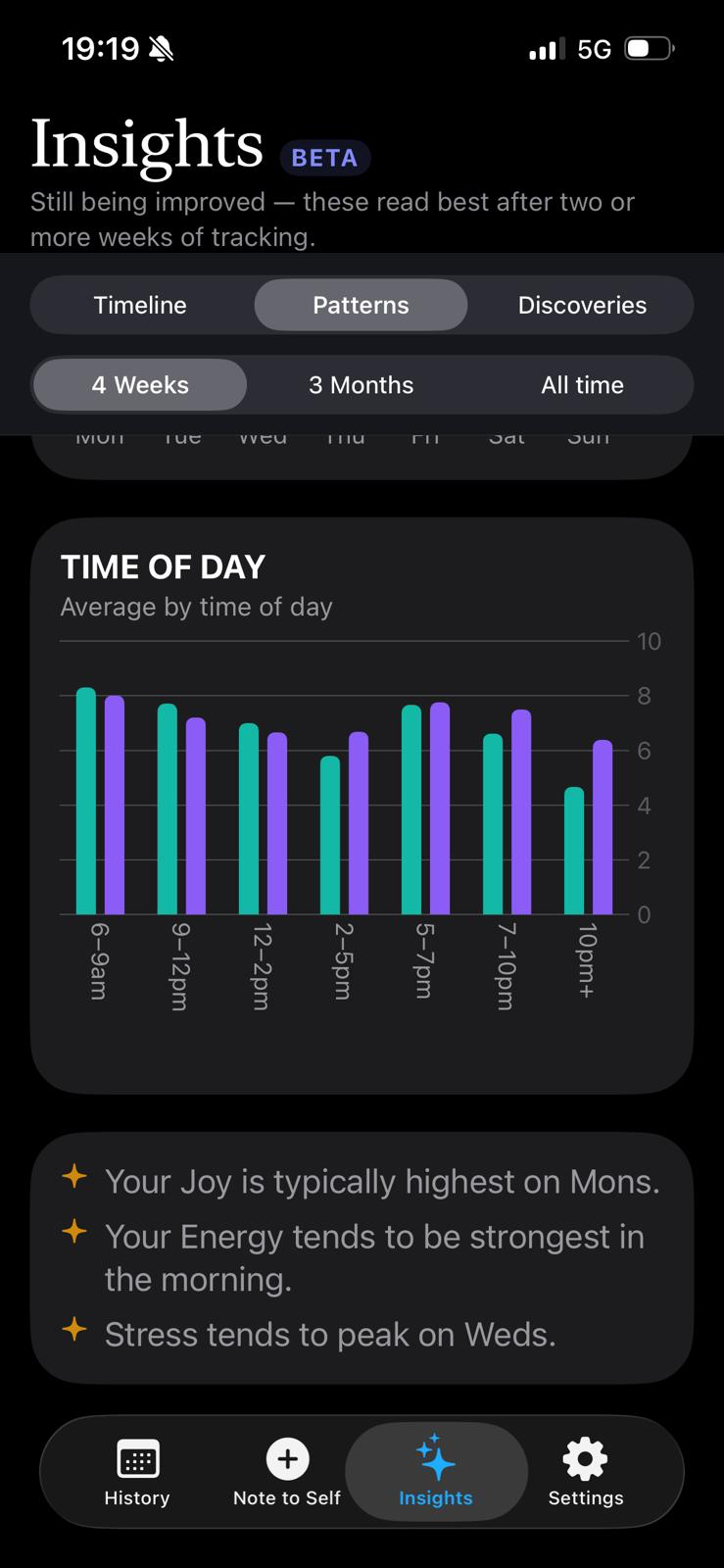
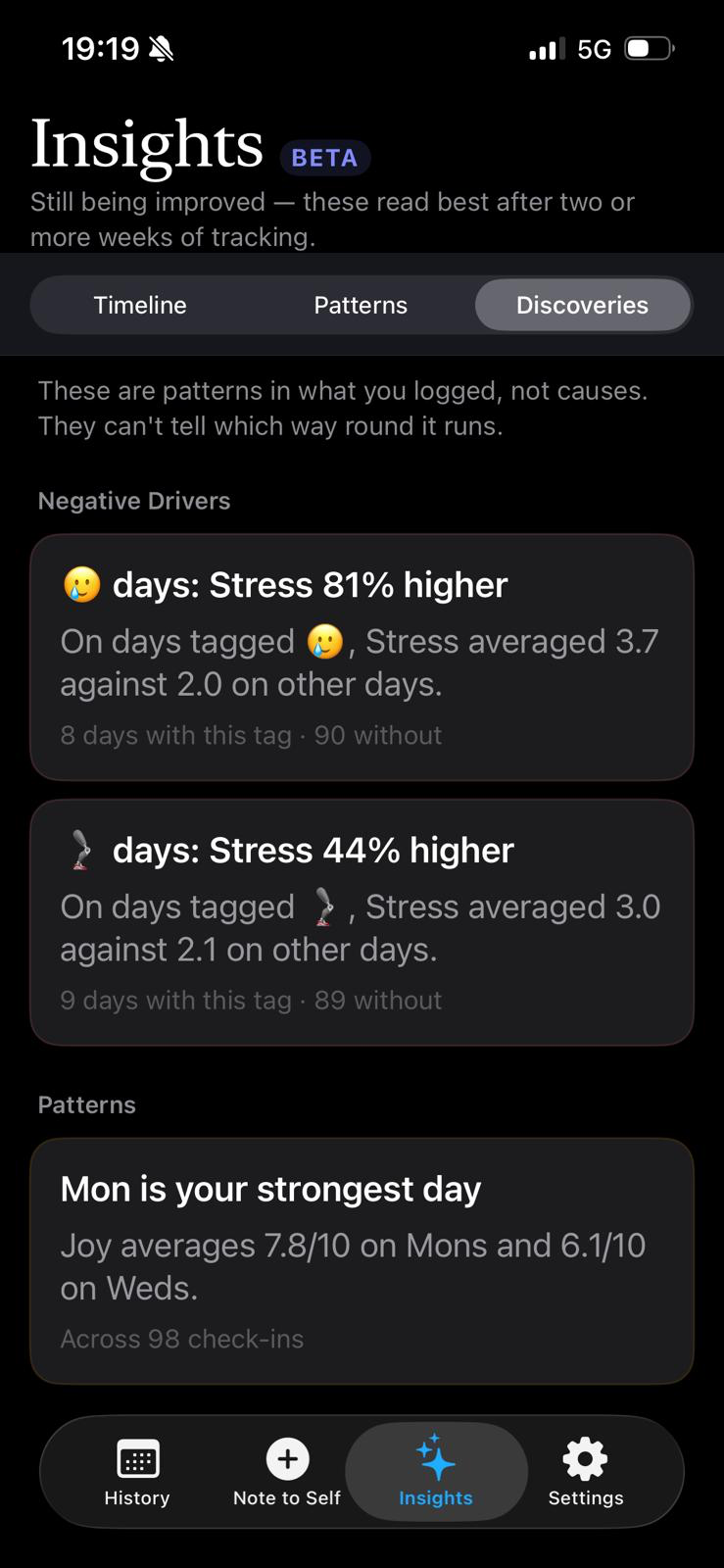
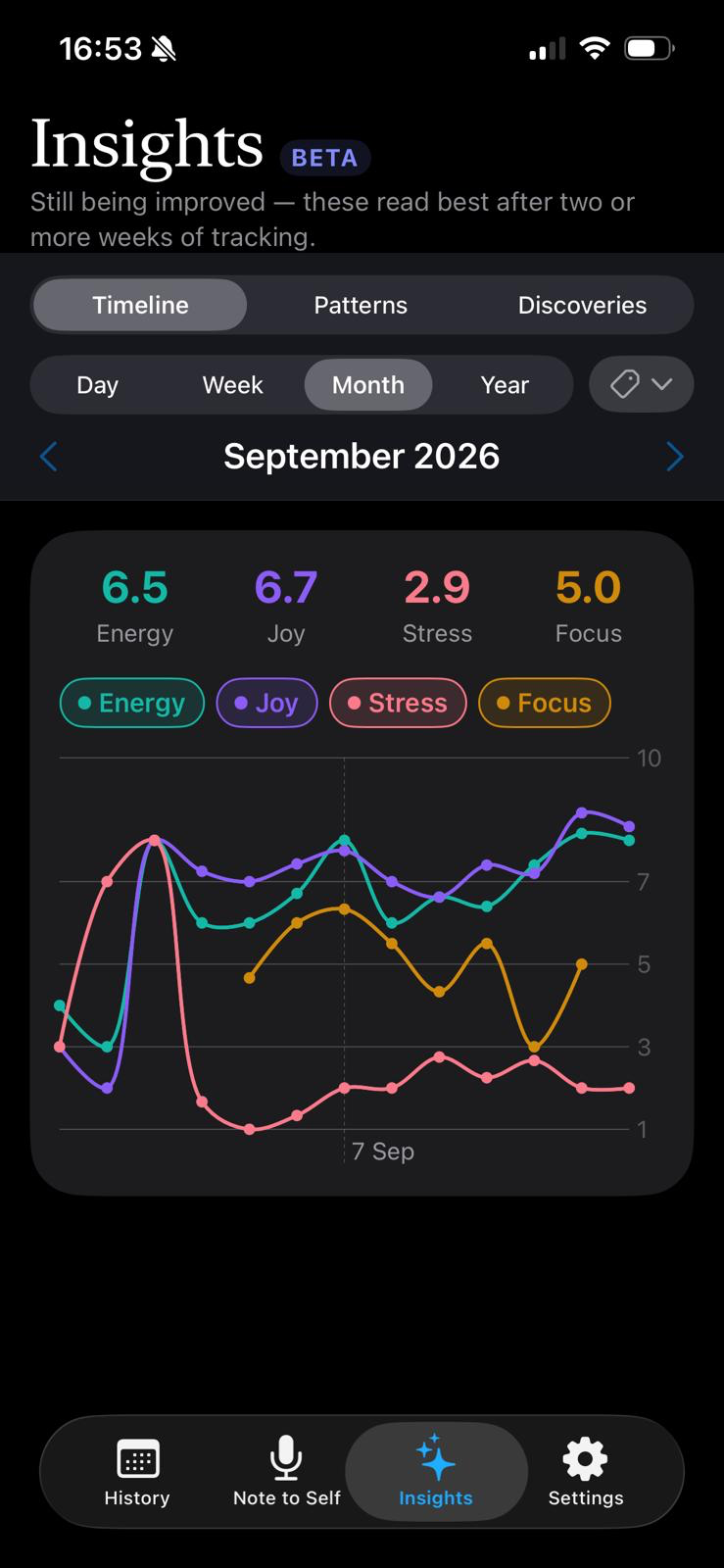
A quick check-in, the calendar it builds over time, and the patterns that come out of it.
What it is
An easy to use mood and energy tracker
Most journalling apps ask you to journal or track your feelings day to day, but don't give anything back. Note to Self is the first app to take your inputs and run the insights and correlations for you.
It helps you understand how the things in your life are connected, and how they affect your energy, your mood, and other scales like anxiety, pain, focus or sleep.
Talk or type
Record a voice note and it transcribes itself. Or type, if you would rather not hear your own voice.
Four scales, two of them yours
Energy and Joy come as standard. The other two start as Stress and Focus and you can rename them to whatever you are actually tracking.
Tags that mean something
An emoji, plus your own words for what it means. A tag can carry template text, so a leg day tag drops your routine straight into the note.
A calendar you can read at a glance
Every day is a pair of rings. Good weeks and rough ones are obvious from across the room.
Patterns, honestly framed
It will tell you your joy runs higher on gym days. It will also tell you that is a pattern, not a cause.
Yours to keep
Export everything as plain files whenever you like. Optional iCloud backup so a lost phone does not mean lost notes.
Insights
The patterns it might find
Tag whatever you want to keep an eye on: medication, a heavy dinner, a long run, time with friends. Once there is enough data, Insights looks for real differences between days with that tag and days without, and tells you the size of the difference along with how many days it is based on.
A few made-up examples of the kind of thing it looks for, not real data:
💊 days: Energy 18% higher
On days tagged 💊, Energy averaged 7.1 against 6.0 on other days.
🍕 days: Focus 22% lower
On days tagged 🍕, Focus averaged 4.3 against 5.5 on other days.
👫 days: Joy 31% higher
On days tagged 👫, Joy averaged 8.0 against 6.1 on other days.
🏃 running days: Energy 21% higher after
On the two days after you log a run, Energy averaged 7.3 against 6.0 otherwise.
🦿 pain days: Stress 27% higher
On days tagged 🦿, Stress averaged 3.8 against 3.0 on other days.
🏠 work-from-home days: Stress 28% lower
On days tagged 🏠, Stress averaged 2.3 against 3.2 on other days.
What people say
"This app has been a game changer for me. It's so easy to log my mood, energy and key activities, I'm starting to see trends about my health I never knew before! It's so easy to use and already bringing value."
Laura
Privacy
Nobody else reads this
That is the whole point of the app, so here it is in plain terms rather than buried in a policy.
I never see your journal
Your notes, scores and tags stay on your phone, with optional backup to your own iCloud. I never see them, and the app has no code that could send them to me. Your recordings, notes to future self and insights stay private too.
iCloud only if you turn it on
Backup is off until you switch it on. When you do, it goes to your own iCloud, reachable only by you.
Voice notes
Turning speech into text is done by Apple's speech recognition, the same service behind dictation on your keyboard, and is handled under Apple's privacy policy. It never comes to me.
Anonymous counts, no ads
The app reports anonymous counts of which screens are used and which actions are taken, and nothing of what you write. TelemetryDeck handles these counts in the EU without storing IP addresses. Switch them off in Settings, then Usage, then Share anonymous usage.
Read the privacy policy for the full details.
About
Twenty diaries since the age of nine. Now I lead a data team. This app was always going to happen.
Hi, I'm Sara 👋
I grew up writing diaries and have been a keen journaller for as long as I can remember. Whenever something is going on in my life, my instinct is usually to write it down, look for patterns and try to figure out why I'm feeling the way I am.
Over the years, that habit moved from diaries into the Notes app on my phone. I've dealt with chronic knee pain for years, and somewhere in my Notes is a ridiculously long running investigation into it. Was it the long walk yesterday? My calves? Tight hips? Stress? The gym? My shoes? Why did it feel great last Tuesday and terrible today?
I found myself doing the same thing with my mood. My menstrual cycle can have a huge impact on how I feel. Some weeks I'm energetic, optimistic and ready to take on the world. Other days I can feel emotional, flat or overwhelmed, and only afterwards realise, ohhh, this happens at exactly the same point every month.
And then there are all the other variables of being a human: sleep, exercise, work, relationships, travel, stress, hormones, medication, alcohol, socialising, alone time.
Maybe unsurprisingly, I also work in data. I've spent my career working with data, analytics and technology, essentially helping organisations take lots of messy information and turn it into something useful.
And at some point I realised: why wasn't I able to do the same thing with my own life? I had years of thoughts, symptoms, moods and observations scattered across diaries, Notes and various apps.
There was so much information there. But very little insight.
I kept thinking: there is so much information here. Why is it so hard to see the patterns?
I didn't want another app that only asked me to give my day a score out of 10. I wanted something that helped me capture the little signals of everyday life, quickly enough that I'd actually use it, and then helped me connect the dots over time.
Something that could eventually say:
- Hey, you tend to feel like this around this point in your cycle.
- Your mood is noticeably better on days you exercise.
- You've mentioned feeling overwhelmed after several busy days in a row.
This thing you thought was random might not actually be random.
So I started building the app I wanted for myself. It's part journal, part tracker, part curious friend, with a little bit of data nerd thrown in.
And ultimately, it's based on a very simple idea: the more we notice about ourselves, the better we can understand ourselves.
I'm building this because I want to understand my own patterns a little better. I hope it helps you understand yours too.
Sara
Privacy policy, in full
Every detail, not just the summary
Note to Self is a private journal. This is the complete policy: what the app stores, where it lives, and who can reach it.
The short version
Your journal is private. We never receive or see its contents. Your check-ins, notes and recordings stay on your device and, if you switch on backup, in your own Apple iCloud. There is no Note to Self account.
The app sends anonymous usage counts through TelemetryDeck to show which screens and actions are used. Nothing you write, record, score or name as a tag is included. You can switch these counts off. Section 6 covers this.
Voice transcription uses Apple: when you record a voice note, the recording is sent to Apple's speech recognition service to be turned into text. It goes to Apple, never to us. Section 4 covers this.
01 Who this policy is from
This policy covers the Note to Self iOS application. In this document, "we" and "us" mean the developer of Note to Self, and "you" means the person using the app.
02 What the app stores, and where
Everything below is written to your device's own private app storage. None of it is transmitted to us.
| What | Where it lives |
|---|---|
| Check-in scores (Energy, Joy, and your two customisable scales) | On your device |
| Written notes and voice-note transcripts | On your device |
| Audio recordings of your voice notes | On your device |
| Your tags, what each one means to you, and any template text | On your device |
| Notes to future self | On your device |
| Insights and patterns, worked out on your phone | On your device |
| Settings (reminder times, appearance, scale names, word corrections) | On your device |
We have no access to any of it. There is no mechanism in the app for your content to reach us, because there is nowhere for it to go.
03 iCloud backup
Backup is off until you turn it on. When you do, the app copies the same files into your own iCloud Drive container, so that losing your phone doesn't mean losing your notes, and so you can restore them on a new device.
That container belongs to your Apple Account. It is reachable by you and governed by Apple's iCloud terms and privacy policy. We cannot read it, list it or recover it for you.
If you turn backup off, or delete the app, the copy in iCloud is not removed automatically. You can delete it yourself in Settings › your name › iCloud › Manage Account Storage.
04 Voice notes and transcription
When you record a voice note, the app asks Apple's speech recognition to turn it into text, the same service behind dictation on your keyboard.
The recording is sent to Apple for that step. Apple processes it under its own privacy policy. The resulting transcript comes back to your device and is saved there with the rest of your entry. At no point does the audio or the transcript reach us.
If you would rather not use Apple's speech recognition, type your notes instead of recording them, or decline the Speech Recognition permission when the app asks. Typing is unaffected. Anonymous usage counts are controlled separately in Settings, then Usage, then Share anonymous usage.
05 Permissions the app asks for
- Microphone, used only while you are actively recording a voice note.
- Speech recognition, used only to transcribe a voice note you have recorded, as described in section 4.
- Notifications, used only to remind you to check in, at times you choose. Reminders are scheduled on your device and do not send reminder information anywhere.
You can refuse or revoke any of these in iOS Settings. Refusing notifications or speech recognition does not stop you using the rest of the app.
06 Anonymous usage counts
The app reports anonymous counts of which screens are opened and which actions are taken. These help us understand how the app is used. This is the complete list of what can be sent:
- The app was opened.
- A tab was opened: History, Note to Self, Insights or Settings.
- An Insights view was opened: Timeline, Discoveries or Patterns.
- A new note was opened.
- A note was submitted, and whether it was typed or spoken.
- A tag was added.
- Search was used.
- A note to future self was saved.
- Onboarding was finished.
- The number of tags you have, as a band: none, 1 to 5, 6 to 10, or 11 or more.
Each event includes the app version, the iOS version and a random identifier generated on your phone when you install the app. It includes no Apple identifier, advertising identifier, name, email address or location. These anonymous counts cannot be used to identify anyone.
Nothing you write, record, score or name as a tag is included. No note text, transcript, recording, score, tag name, tag meaning or date of any entry is ever sent. The app has no code that could send this content to us or to the analytics processor.
TelemetryDeck, a European analytics company, processes these counts in the EU. It does not store IP addresses and does not allow the data to be used for advertising.
To switch this off, open Settings, then Usage, then turn off Share anonymous usage. Once it is off, no usage events or accompanying information are sent.
07 What we don't do
- No accounts, sign-ups, email addresses or passwords.
- No advertising, and no advertising identifiers.
- No selling or renting your journal or usage counts. TelemetryDeck processes only the anonymous usage counts described above.
- No tracking you across other apps or websites.
08 When you share something
The app can export your data as a folder of files, and can produce a shareable card for a day or a single check-in. Both are things you start deliberately.
Once you hand a file or an image to another app, Messages, Mail, a cloud drive, a social network, it is governed by that app's terms, not this policy. Journal exports and shared cards are sent only when you choose to share them. Anonymous usage counts, Apple speech recognition and optional iCloud backup work as described above.
09 Keeping and deleting your data
Your entries stay until you delete them. There is no retention period on our side, because there is no copy on our side.
- Delete a single check-in by swiping it away in the day view.
- Delete everything on the device by deleting the app.
- Delete the iCloud copy through iOS Settings, as described in section 3.
We hold no copy of your journal, so we cannot delete or hand over its contents. You can stop anonymous usage counts in Settings, then Usage, then Share anonymous usage.
10 Children
Note to Self is not directed at children under 13. The anonymous usage counts described above do not include names, ages or journal contents and cannot be used to identify anyone.
11 Changes to this policy
If the app ever starts doing something this policy doesn't describe, the policy will be updated before that change ships, and the date below will change with it. Material changes will be called out in the app.
12 Contact
Questions about this policy, or about how the app handles your data, can be sent through the support form.
Last updated: